Use two Android phones as a wireless camera and handheld monitor
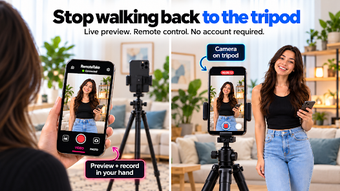
Turn two Android devices into a wireless filming setup: one phone mounted as the camera, a second used for live monitoring and remote control. RemoteTake: Camera Remote, from MeanCoder, targets solo creators who shoot talking-head videos, tutorials, and social clips. The app pairs devices over a local network with a code, offers live preview and remote recording controls, and includes framing guides and a synchronized countdown to help creators prepare and manage takes.
What RemoteTake does for solo creators
RemoteTake converts two Android devices into a coordinated filming rig so one person can both operate and appear in shots. The Camera device captures video while the Controller displays a real-time preview, lets you trigger recordings, switch cameras, and manage take status. The workflow replaces a second operator, giving creators an immediate way to judge composition and start takes without walking to the tripod-mounted device.
How the app connects devices and handles media
The app uses a simple code-based pairing system over a local Wi-Fi or hotspot, avoiding cloud dependencies and keeping all recordings stored on the Camera device. What's more, the Free tier supports 1080p recording while a Pro tier adds 4K and teleprompter features. This local-first approach reduces latency during the live preview and local storage keeps files on the capturing phone.
Interface, controls, and framing aids
The Controller interface exposes remote start/stop, zoom and focus adjustments, a synchronized countdown timer, and framing guides including vertical safe zones for social formats. Advanced framing tools appear as on-screen overlays so you can align subject placement before recording. The teleprompter and remote-audio capture are listed as higher-tier capabilities, letting creators read scripts or route audio from the Controller when needed.
Performance expectations and who benefits most
Because pairing runs on a local network, live preview performance is low-latency on a typical Wi-Fi or hotspot environment, which suits single-person productions. Educators, vloggers, and presenters who need precise on-device monitoring gain the most. However, creators who require cloud-based workflows or remote collaboration across locations will find the local-only model does not provide that capability.
In conclusion, a focused tool for independent on-device filming
RemoteTake is a targeted option for solo content creators who need direct, low-latency monitoring and remote control from a second Android device. It supports typical single-operator productions and keeps footage on the recording device, which suits privacy-minded workflows. Expect trade-offs if your process depends on cloud transfer or multi-person remote directing; the app prioritizes local control over distributed collaboration.